For small teams with repetitive work
No-Code Automation Starter Pack:
plan before you build.
The No-Code Automation Starter Pack helps you choose a workflow, estimate its value, map the handoffs and plan the failure tests. A seven-tab workbook and guide for turning “we should automate this” into a buildable brief.
7-tab Excel workbook + 7-page PDF guide
One-time purchase · USD · Applicable tax shown at checkout
The exception is part of the plan.
Illustration of the method. Not a product screenshot, customer result or independent certification.
A successful test run
is only the beginning.
The No-Code Automation Starter Pack helps you choose a workflow, estimate its value, map the handoffs and plan the failure tests. A seven-tab workbook and guide for turning “we should automate this” into a buildable brief.
A duplicate arrives.
Does it create a second customer record—or get handled deliberately?
A field is missing.
Does the process stop visibly—or push incomplete data into the next tool?
The automation saves clicks.
Does it still save effort after review, maintenance and subscription costs?
A method you can inspect
Go from a repetitive task to a clear build brief.
Choose one workflow
Inventory the work and compare estimated benefit, confidence and build effort.
Map the handoffs
Specify triggers, fields, destinations, owners and approval points.
Test before launch
Use success and failure scenarios, then make an explicit launch decision.
Open the actual product
No need to take
the cover’s word for it.
Read page 3 of the seven-page guide included in the download. The sample is ungated and opens at full resolution.
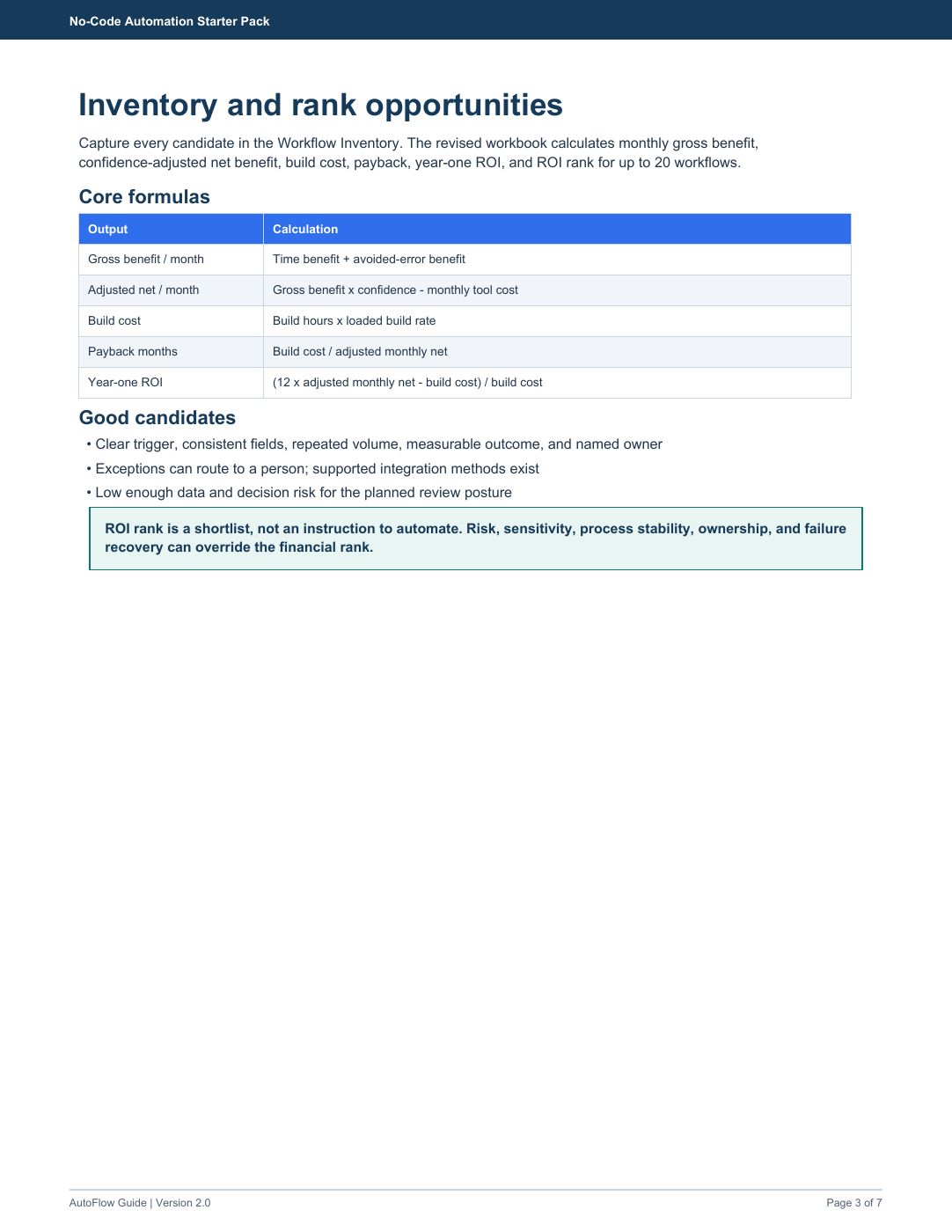
What the method looks like
What happens when the same lead arrives twice?
A form-to-CRM workflow needs more than “create record.” Define the duplicate rule, missing-field handling and failed-notification path. The free simulation shows those branches using fictional records.
- Make the requirement or process explicit.
- Record what is known and what still needs checking.
- Keep the decision and its assumptions together.
The scenario is illustrative, not a customer case study. The workbook structures your work; it does not supply independently verified results for your business.
Exactly what you get
No-Code Automation Starter Pack
7 workbook tabs, a seven-page guide, README and license in one downloadable ZIP.
- Workflow inventory + ROI calculatorPrioritize up to 20 opportunities and make cost assumptions visible.
- Build blueprintDocument the trigger, field mapping, owner and exception handling.
- Twelve tool-neutral recipesStarting patterns to adapt, not installed platform integrations.
- Test log + launch checklistTen test scenarios to guide checks before you switch it on.
- Start Here + seven-page PDF guideREADME and internal-business license included.
A good fit if…
You have one stable process involving forms, spreadsheets, a CRM or similar tools—and someone who will own it.
Not the right purchase if…
You need a ready-to-import n8n/Zapier template, installed integrations or an automation managed for you.
Try the thinking before you buy
See the difficult cases, not just the happy path.
Free browser simulations with synthetic data. They illustrate decisions to make; they are not installed integrations or evidence of customer results.
Why a toolkit, when you have AI?
A generated answer
is the start of the work.
AI can draft a happy-path workflow quickly. The work is deciding what the process should do with duplicates, missing data and failed steps. Use the pack to document those decisions and the costs before implementation—not to assume the generated plan is production-ready.
These materials are AI-assisted. We do not claim human certification, an independent professional audit or a proven customer track record. Inspect the sample and scope before buying.
Purchase details
Know what you’re buying.
Can I import this directly into Zapier, Make or n8n?
No. The pack contains planning worksheets and tool-neutral recipes, not platform workflow files. You or an implementer must build, test and maintain the actual integration.
What happens after I pay?
Payhip handles checkout and gives access to the digital ZIP download after successful payment. It contains the .xlsx workbook, PDF guide, README and license. No physical product is shipped.
Do I need Excel?
The workbook is Excel-compatible. Imports into Google Sheets or other spreadsheet apps may change formulas, validation, protection and formatting. Check imported results before relying on them; identical behavior is not promised.
Can my team reuse the files?
Yes, within the purchasing business or team. Internal editing and duplication are allowed. Resale and redistribution are not.
What if the download has a problem?
Email hello@saassleuth.com within 14 days for a corrupted, inaccessible or materially misdescribed file. We will provide a working replacement or an appropriate refund. Change-of-mind refunds after successful digital delivery are not promised.
Is custom work included?
No. The digital product is self-serve. Written service enquiries and any implementation are separate, with an agreed scope, price and delivery date before paid work starts. No call is required.
A separate option: written help
Want a written blueprint for your own workflow?
Ask about a fixed-scope written review of triggers, data mapping, exception handling, tests and handover. Implementation is assessed and quoted separately.
Send a non-sensitive brief: business goal; current steps; tools; approximate frequency; where it breaks.
Enquire by email →No charge to enquire. A written scope, price and delivery date must be agreed before work begins. Do not send credentials, customer records or confidential exports. Shared portfolio support: hello@saassleuth.com.
No-Code Automation Starter Pack
Build the plan before you build the automation.
Get the starter pack · $39 →Digital download. One-time payment. No guaranteed business result.