How to Automate Lead Follow-Up for Service Businesses
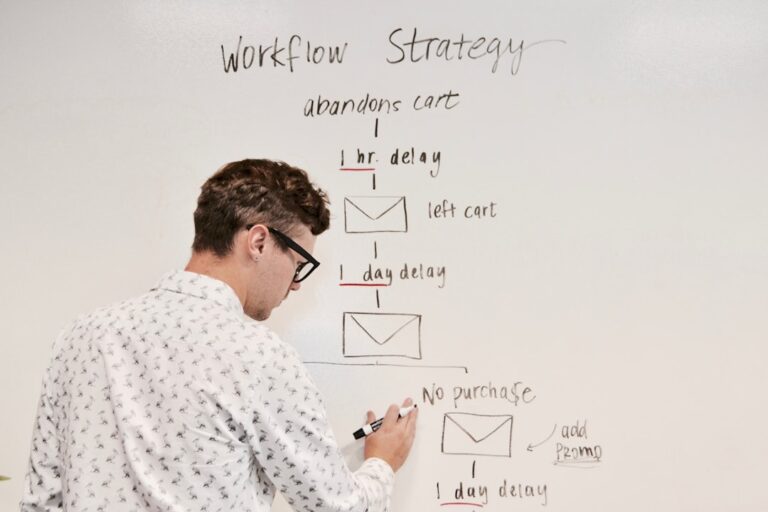
Studies consistently show that responding to a new lead within five minutes makes you seven times more likely to convert them than responding within an hour. For a solopreneur running a service business, a five-minute response window is unrealistic — unless the response is automated. The bigger problem is what happens after the first reply. Most service businesses send one email, don’t hear back, and quietly let the lead go cold. Not because they gave up on purpose, but because they got pulled into client work, forgot to follow up, or felt awkward sending a third message without a system telling them it was appropriate. Automated follow-up eliminates all three failure modes. This guide builds the full sequence from scratch, using tools most service businesses already have or can access for free.
Why Lead Follow-Up Is the Highest-ROI Automation for Service Businesses
Most automation guides focus on saving time. Lead follow-up automation is different — it’s primarily about recovering revenue that’s currently being lost silently. If your service business gets 20 inquiries per month and you’re converting 5 of them, it’s likely that several of the 15 non-conversions weren’t lost to a competitor. They were lost to silence, delay, or a single unanswered email. Automating the follow-up sequence turns that silent churn into a recoverable opportunity.
The math is straightforward. If improving your follow-up consistency converts two additional clients per month at an average project value of $1,500, that’s $3,000/month in recovered revenue from a system that takes an afternoon to build and costs under $30/month to run. No other automation you can build delivers that ratio.
The Anatomy of an Effective Automated Follow-Up Sequence
Before building anything, it helps to have a clear picture of what the sequence should accomplish. A follow-up sequence for a service business has five jobs:
- Immediate acknowledgment — confirm the inquiry was received and set an expectation for when they’ll hear from you personally
- Value delivery — give the lead something useful before asking for their time or money (a relevant guide, case study, or answer to the most common question you get)
- Soft check-in — a personal-feeling email that asks if they have any questions and reiterates the path to working together
- Urgency or social proof nudge — a gentle push with a testimonial, result, or time-bounded offer
- Final close or clean exit — one last message that either converts or gracefully closes the loop so the lead doesn’t feel abandoned
Five emails, sent automatically over seven to ten days. Most leads either convert within this window or confirm they’re not ready — either outcome is better than silence on both sides.
Step 1: Capture the Lead Into a Central System
The automation can’t start until the lead is captured somewhere structured. Your trigger — the event that kicks off the sequence — needs to be a data event, not an email sitting in your inbox. The most common capture sources for service businesses:
- Contact form on your website — Typeform, Gravity Forms, Tally.so, or any form tool that sends data to Zapier or Make
- Calendly booking — when someone books a discovery call, that’s a lead event that should trigger immediate follow-up before the call even happens
- Direct email inquiry — harder to automate directly, but tools like Zapier’s Gmail trigger can detect emails with specific subject line keywords and route them into your system
- Social media DM or referral form — any source where you collect a name and email qualifies as a trigger point
The lead data needs to land somewhere trackable — a CRM, a spreadsheet, or a database. If you’re already using Airtable to manage your clients, adding a Leads table to your solopreneur CRM in Airtable takes 15 minutes and gives you a permanent record of every inquiry alongside its follow-up status. If you prefer to track leads in Notion, a simple leads database with Name, Email, Source, Status, and Last Contacted fields covers everything you need.
Step 2: Set Up the Automation Trigger in Zapier or Make
Once your lead capture source is in place, you need a connector that detects the new lead and starts the email sequence. Zapier and Make.com are the two primary options — both work well for this use case, and the right choice depends on your comfort level and the complexity you want to build.
| Tool | Best For | Free Tier | Learning Curve | Sequence Complexity |
|---|---|---|---|---|
| Zapier | Simple linear sequences, wide app support | 100 tasks/month | Low | Good for 3–5 step sequences |
| Make.com | Multi-branch logic, conditional paths | 1,000 ops/month | Medium | Excellent for conditional sequences |
| Native email platform automations (ConvertKit, Brevo) | Email-only sequences without external triggers | Yes — generous | Low | Good for simple drip sequences |
For most service businesses building their first lead follow-up automation, Zapier is the faster path. The basic workflow: Trigger: New submission in [your form tool] → Action: Add subscriber to email sequence in [your email platform] → Action: Create lead record in [your CRM or Airtable]. That three-step Zap starts the entire follow-up process the moment an inquiry arrives, even at 2am on a Sunday.
If you want conditional logic — for example, sending different sequences to leads from different service categories — Make.com handles branching paths more elegantly. Our comparison of Make.com vs Zapier for small business covers exactly when it’s worth making the switch.
Step 3: Write the Five Follow-Up Emails
The email content is where most automations fail — not the technical setup. Generic, templated emails that feel automated get ignored or unsubscribed. The goal is emails that feel personal at scale. Here’s the framework for each:
Email 1 — Immediate (within 5 minutes): Acknowledgment
Subject: “Got your message — here’s what happens next”
Content: Confirm receipt, introduce yourself in one sentence, explain the next step (you’ll be in touch by [specific timeframe] or here’s a link to book directly), and express genuine interest. Keep it under 100 words. Speed matters more than length here.
Email 2 — Day 1 (24 hours later): Value delivery
Subject: “[First name], something that might help while you’re thinking about it”
Content: Share one genuinely useful thing — a short case study, a common mistake you help clients avoid, or the answer to the question you get asked most often before someone hires you. No pitch. Build credibility by being useful first.
Email 3 — Day 3: Soft check-in
Subject: “Quick check-in — any questions?”
Content: Short, personal-feeling. “I wanted to follow up and make sure you got my earlier message. If you have any questions about working together, I’m happy to answer them — or if you’re ready to talk, here’s a link to grab 20 minutes on my calendar.” Include your Calendly link. Nothing else.
Email 4 — Day 5 or 6: Social proof or result
Subject: “What [similar client type] said after working together”
Content: One testimonial or client outcome, specific and concrete. Follow with a single soft CTA — “If this sounds like the outcome you’re looking for, I’d love to learn more about your situation.”
Email 5 — Day 7–10: Final close
Subject: “Closing the loop — [first name]”
Content: The most effective final email is honest and brief: “I wanted to follow up one last time before I close your inquiry in my system. If the timing isn’t right or you’ve gone another direction, no worries at all — just let me know and I’ll stop reaching out. If you’re still interested, here’s the easiest way to take the next step: [link].” This email consistently generates responses from leads who went silent — the honesty and permission to say no makes it feel safe to re-engage.
Step 4: Connect to Calendly for Frictionless Booking
Every email in your sequence should make it easy to take the next step, and for a service business, the next step is almost always a discovery call. Calendly eliminates the back-and-forth of scheduling — you include a link and the lead picks a time without a single email exchange. Set up a dedicated discovery call event type (20–30 minutes is standard) and include that link in emails 3, 4, and 5.
The Calendly integration also creates a valuable feedback loop: when a lead books through your Calendly link, Zapier can detect that event and automatically update the lead’s status in your CRM from “In Sequence” to “Discovery Call Booked” — pausing further sequence emails so they don’t receive a follow-up after they’ve already booked. If you haven’t set this up yet, our guide to using Calendly to automate client scheduling covers the full configuration including the Zapier connection.
Step 5: Set Up the Stop Condition
An automated sequence that keeps sending after a lead has replied, booked, or unsubscribed is the fastest way to damage your reputation with a warm prospect. Every follow-up automation needs a clear stop condition: when any of the following happen, the sequence pauses and flags you for manual follow-up:
- Lead replies to any email
- Lead books a call via Calendly
- Lead unsubscribes
- Lead is manually marked as “Not a fit” or “Hired someone else” in your CRM
Most email automation platforms (ConvertKit, Brevo, ActiveCampaign) handle reply detection natively — replying to any email in the sequence removes the lead from the automation. For the Calendly booking trigger, you need a Zapier workflow: New event created in Calendly → Find matching subscriber in email platform → Remove from sequence.
Once a lead is out of the automated sequence, add them to a simple “Replied — manual follow-up” view in your Airtable or Notion leads database. This view is what you check each morning — it shows only the leads that need a human response, not the ones being handled automatically.
Extending the System: What to Build Next
Once your lead follow-up sequence is running cleanly, the natural next automation is what happens when a lead converts — the client onboarding flow. The handoff from “booked” to “onboarded” is another place where service businesses lose professionalism points: the frictionless automated follow-up that impressed the lead suddenly gives way to manual contract emails and intake forms sent three days late. Our guide on automating client onboarding as a freelancer covers the full onboarding automation — it connects directly to the lead system you just built.
For reporting — tracking your lead volume, conversion rate, and sequence performance over time — connecting your lead data to a Google Sheet via Zapier creates a live dashboard that updates automatically. This gives you the data to know which lead sources convert best, which sequence emails get the most replies, and when your conversion rate drops so you can investigate. Our Zapier and Google Sheets reporting guide shows exactly how to set this up for any business metric including lead pipeline data.
- Most service business leads are lost not to better competitors but to slow response times and inconsistent follow-up — automation fixes both without requiring any manual effort after setup
- A five-email sequence over 7–10 days (immediate acknowledgment, value delivery, soft check-in, social proof, final close) covers the full decision window for most service business leads
- Zapier is the fastest path for a simple linear sequence; Make.com is better when you need conditional paths based on lead type, service category, or behavior
- Every automated sequence needs a stop condition — reply detection, Calendly booking, and manual CRM status changes should all pause the sequence immediately to prevent embarrassing follow-ups to converted clients
- Build the onboarding automation next — the lead sequence and onboarding flow together create an end-to-end client acquisition system that runs without manual intervention from inquiry to project kickoff
Frequently Asked Questions
How many follow-up emails is too many?
Five emails over seven to ten days is the upper limit for most service businesses. Beyond that, you’re more likely to irritate potential clients than convert them. The exception is high-consideration services (legal, financial, medical) where the decision cycle is longer — in those cases, extending the sequence to 8–10 emails over 21 days with longer gaps between messages is appropriate. The key signal to watch is unsubscribe rate: if it climbs above 2% per email, reduce frequency or improve content before adding more messages.
What email platform should I use for the follow-up sequence?
For service businesses under 1,000 contacts, ConvertKit (Kit) on the free plan is the strongest option — visual automation builder, reliable deliverability, and straightforward Zapier integration. Brevo is a close second and handles unlimited contacts on its free plan. MailerLite ($9/month) is worth the small cost for its cleaner interface and more flexible trigger options. ActiveCampaign is the upgrade path if you need advanced conditional logic (different sequences based on lead behavior or service type) — but most service businesses don’t need that complexity until they’re generating 50+ leads per month.
Can I run this automation without Zapier or Make?
Yes, if your lead capture source and email platform are the same tool or natively integrated. HoneyBook, Dubsado, and 17hats are all-in-one service business platforms that handle lead capture, follow-up sequences, contracts, and invoicing natively — no Zapier required. The trade-off is that these platforms are more expensive ($19–$49/month) and more opinionated in their workflow. If you’re just starting to automate, a native platform may be simpler. If you’re already using separate tools you’re happy with, Zapier glues them together for less cost.
How do I personalize automated emails so they don’t feel robotic?
Three techniques make the biggest difference: use merge fields for first name and the specific service they inquired about (not just “your inquiry” but “your web design project”); write in plain text rather than HTML templates with headers and logos; and vary sentence length and structure rather than using corporate-sounding language. Read each email out loud before activating it — if you wouldn’t say it that way in a real conversation, rewrite it until you would. The goal is that a lead who replies should feel like they’re continuing a human conversation, not triggering a chatbot response.
What conversion rate should I expect from an automated follow-up sequence?
For service businesses with qualified inbound leads (people who found you and chose to make contact), a well-built follow-up sequence typically improves conversion rates by 15–35% compared to manual ad-hoc follow-up. Absolute conversion rates vary widely by service type and price point — a $200 service converts at a higher rate than a $5,000 project from the same sequence. The most meaningful metric to track isn’t the absolute conversion rate but the percentage of leads that receive all five emails versus leads that reply or book at some point during the sequence. If fewer than 30% of leads engage at any point in the sequence, your email content needs work before you optimize the timing or length.