How to Automate Proposals and Contracts as a Freelancer
Disclosure: We may earn a commission when you purchase through links on this site, at no extra cost to you. How we make money.
Think about the last new client you landed. How long did it actually take from “yes, let’s work together” to money in your account? For most freelancers, the answer is embarrassing — days of back-and-forth, a proposal you rebuilt from a messy Word doc, a contract you dug out of your Downloads folder, a PayPal invoice you sent as a separate step, and at least two “just following up” emails before the deposit arrived. That’s not client work. That’s administration, and it’s eating 3–5 hours per new engagement that you’ll never bill back. The good news: every single step in that chain can be automated, templated, and triggered without you ever opening your email.
Why Manual Proposals Are Costing You More Than Time
The obvious cost of manual proposals is the hours spent. But the hidden cost is worse: speed-to-proposal wins clients. Studies across service industries consistently show that the first vendor to send a proposal after a sales conversation wins the deal at a significantly higher rate than those who wait 24–48 hours. When you’re manually assembling a proposal after each call, you’re consistently slower than competitors using templates — and slowness reads as disorganization to potential clients.
There’s also the inconsistency problem. A manually assembled proposal might have last year’s pricing, an outdated service package, or a contract clause you meant to update three clients ago. Automated, template-driven proposals are always current, always branded, and always in the right format — because you update the template once and every future proposal inherits the changes automatically.
The Tools That Power an Automated Proposal Workflow
You don’t need a complicated stack. The core automation lives across three categories of tools: a proposal and contract platform, a payment processor, and an automation connector to wire them together.
Proposal + Contract Platforms
These tools combine proposal creation, e-signature collection, and often payment processing in one interface — which is why they’re the cornerstone of this workflow. The right choice depends on your business model:
- HoneyBook ($19/month on the Starter plan): Best for creative service businesses — photographers, designers, copywriters, event planners. Combines proposals, contracts, invoices, and a basic CRM. The automation features let you build multi-step workflows: proposal sent → signed → invoice triggered → project created.
- Dubsado ($20/month): More customizable than HoneyBook, with deeper automation logic and stronger form-building for intake questionnaires. The learning curve is steeper, but it handles complex service packages and retainer structures better.
- PandaDoc (free tier available): Best for B2B service providers and consultants who want a polished, professional proposal design. The free tier covers unlimited documents and e-signatures; the paid tiers add workflow automation and CRM integrations.
- Bonsai ($17/month): Purpose-built for freelancers — includes time tracking, proposals, contracts, invoicing, and expense tracking in one tool. The most integrated option for solo operators who want everything under one roof.
Scheduling Integration
The proposal automation often starts before the proposal itself — at the discovery call booking step. Calendly can trigger the start of your proposal workflow automatically: when a discovery call is booked, Zapier fires a Zap that creates a new contact in your proposal tool and pre-populates a proposal draft with the client’s name and the service they selected. By the time the call ends, your proposal template is already waiting — you just personalize two lines and send.
Automation Connectors
Zapier and Make.com handle the cross-app connections: moving data between your proposal tool, your project manager, your email, and your CRM. Both integrate natively with HoneyBook, Dubsado, PandaDoc, and most payment processors. For a broader look at what’s possible with these connectors, see the best Zapier automations for solopreneurs step by step.
Proposal Tool Comparison for Freelancers
| Tool | Starting Price | E-Signature | Native Payments | Automation | Best For |
|---|---|---|---|---|---|
| HoneyBook | $19/month | Yes | Yes (2.9% + $0.25) | Strong (native flows) | Creative freelancers |
| Dubsado | $20/month | Yes | Yes (via Stripe/Square) | Very strong (custom logic) | Complex service packages |
| PandaDoc | Free / $35/month | Yes | Yes (paid tiers) | Moderate (paid tiers) | B2B consultants |
| Bonsai | $17/month | Yes | Yes | Basic | Solo freelancers, all-in-one |
The Automated Workflow, Step by Step
Here’s the complete end-to-end flow — from inquiry to signed contract to deposit collected — with zero manual steps once it’s built:
Step 1: Discovery Call Booked (Trigger)
A prospect books a discovery call via your Calendly link. Calendly captures their name, email, and any intake questions you’ve added to the booking form (e.g., “What service are you interested in?” or “What’s your monthly budget?”). This booking event is the trigger for everything that follows.
Automation: Zapier detects the new Calendly booking → creates a new contact in your proposal tool (HoneyBook, Dubsado, or PandaDoc) with the prospect’s details pre-filled → optionally adds them to your CRM or a tracking database in Airtable or Notion.
Step 2: Proposal Sent Within Minutes of the Call
Your proposal template is already built inside your platform of choice — pricing, services, testimonials, FAQs, all of it. After the discovery call, you open the pre-created draft, add 2–3 lines of personalization (project name, specific scope notes), and hit send. The whole thing takes 5 minutes instead of 45.
More advanced setup: in Dubsado, you can configure the workflow to send a proposal automatically after a lead form is submitted, without any manual action on your end. If your services are productized (fixed packages with fixed pricing), this fully hands-off version works reliably.
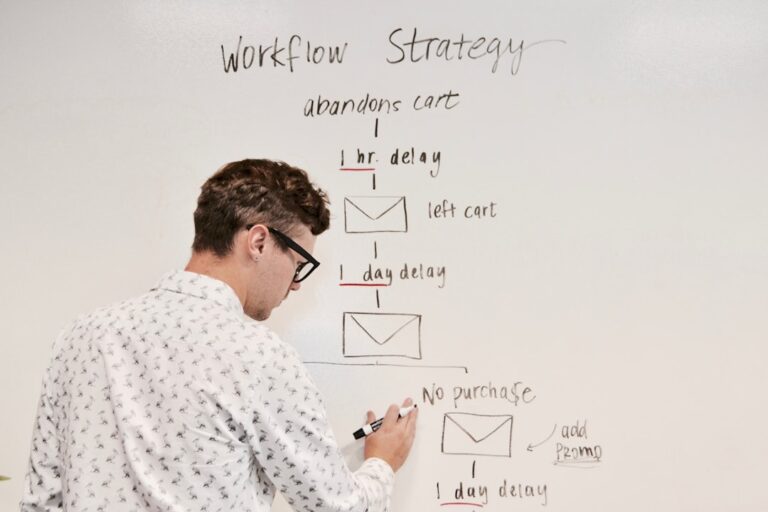
Step 3: Automated Follow-Up If No Response
A prospect who doesn’t open your proposal within 48 hours gets a gentle automated nudge — “Just wanted to make sure this landed in your inbox” — sent from your email automatically. HoneyBook and Dubsado handle this natively. If you’re using PandaDoc, Zapier monitors the proposal status and triggers a follow-up email via Gmail when the status stays “sent” past your defined window.
Set two follow-ups maximum: one at 48 hours, one at five days. After that, mark the lead as inactive and move on. The automation handles both sends; you never have to remember to follow up manually again.
Step 4: Contract Triggers Automatically on Proposal Acceptance
When the prospect accepts the proposal (clicks “Accept” or signs the embedded agreement), your platform immediately generates and sends the contract for signature. No gap between proposal acceptance and contract — the momentum of the “yes” carries straight through to the legal step.
In Dubsado and HoneyBook, this is a native workflow step: proposal signed → contract auto-sent. In PandaDoc on the Business tier, the same logic applies. If you need to bridge separate tools, a Zapier trigger on “proposal accepted” sending a DocuSign or Dropbox Sign request via webhook handles it cleanly.
Step 5: Deposit Invoice Sent After Contract Signature
Once the contract is fully executed, the deposit invoice fires automatically. 50% upfront is standard for most freelance services; adjust to your business model. Most platforms generate the invoice as a separate document with a direct payment link — Stripe, PayPal, or ACH depending on your setup.
The key is that the invoice goes out immediately after the contract is signed, not when you remember to send it the next morning. Speed here matters — a client who just signed a contract is maximally motivated to complete the engagement. Every hour of delay between signature and invoice reduces that momentum.
Step 6: Project Kickoff Workflow Triggered by Deposit
When the deposit payment is confirmed, the final automation fires: a welcome email goes to the client, a new project is created in your project management tool, and your onboarding sequence kicks off. This is where your proposal automation hands off to your client onboarding automation — for everything that happens after the deposit, see the complete guide to automating client onboarding as a freelancer.
Storing and Organizing Proposals in Your Workflow
Beyond the sending automation, you need a system to track proposal status across all active leads. A simple database in Airtable or a pipeline view in ClickUp gives you a real-time view of every proposal in flight — sent, opened, accepted, declined — without manually checking each one.
Zapier syncs the status back from your proposal tool to your tracking database automatically: when a proposal status changes in HoneyBook, the Airtable record updates to match. You open your dashboard once per week to see where everything stands, without logging into four tools to piece together the picture.
For building out a complete client management system that handles the full lifecycle — proposals, contracts, projects, and ongoing communication — see how to build a free client portal for freelancers that gives clients visibility into their project status without email back-and-forth.
- The proposal-to-contract-to-deposit chain can be fully automated using a dedicated platform (HoneyBook, Dubsado, PandaDoc, or Bonsai) connected to your scheduling tool via Zapier or Make.com.
- Speed is a competitive advantage — automating your proposal delivery means clients receive it within minutes of your call, not 24 hours later when momentum has faded.
- Tiered proposal templates (basic/standard/premium) outperform single custom quotes and are far easier to automate because the options are pre-defined.
- The two most high-value automation points are the follow-up sequence (48-hour nudge) and the contract trigger on proposal acceptance — both eliminate manual tasks that consistently slip through the cracks.
- Track all proposals in a centralized Airtable or ClickUp database synced via Zapier, so your pipeline is always visible without logging into multiple tools.
Frequently Asked Questions
Do I need all these tools, or can I start with just one?
Start with one platform — HoneyBook or Bonsai for most freelancers — and use its native automation before adding anything external. HoneyBook’s built-in workflow automation handles the proposal → contract → invoice → project chain without Zapier for most standard service businesses. Add Zapier or Make.com only when you need to connect HoneyBook to an external tool (your CRM, project manager, or accounting software). One well-configured platform beats three poorly integrated ones every time.
Is automated proposal sending legally valid?
Yes — the proposal itself is not a legally binding document in most jurisdictions; it’s an offer document. The contract and e-signature are what create the legal agreement, and e-signatures generated through platforms like HoneyBook, Dubsado, PandaDoc, or DocuSign are legally valid under the ESIGN Act (US), eIDAS (EU), and equivalent legislation in most countries. Always consult a lawyer for your specific jurisdiction and service type, but for the vast majority of freelance engagements, this workflow is fully compliant.
What’s the best free option for automated proposals?
PandaDoc’s free plan is the strongest no-cost option — it includes unlimited proposal creation, e-signatures, and basic tracking (views, opens, status). Payment collection and workflow automation require the paid tiers, but if you’re just starting and want automated, professionally branded proposals with e-signatures at zero cost, PandaDoc free handles it well.
How do I handle proposals for services that vary in scope every time?
Build a modular template with optional sections rather than a single fixed layout. In Dubsado and PandaDoc, you can toggle sections on or off before sending — so your base template includes your standard introduction, testimonials, and contract terms, while the scope and pricing sections are customizable per engagement. You’re still doing custom scoping; the automation handles everything else. This hybrid approach typically cuts proposal assembly time from 60–90 minutes to 10–15 minutes per engagement.
Can I automate payment reminders for invoices too?
Yes — all four platforms (HoneyBook, Dubsado, PandaDoc Business, Bonsai) include automated invoice reminders. You set the schedule once: reminder 3 days before due, on due date, and 7 days after. The reminder emails go out automatically with the invoice attached and a direct payment link. This single automation typically cuts average days-to-payment by 30–40% for freelancers who previously sent reminders manually — or didn’t send them at all.
Related Reading
- How to Automate Customer Follow-Up Emails With AI via BizRunBook
- Klaviyo vs Mailchimp for Small Ecommerce Stores 2026 via SaaSSleuth